
A car badgers you. A little wrench lights up on the dash, the lease company emails, the garage sends a text. A scooter, a moped or an e-bike does none of that. There is no service light, no dealer chasing you, and the maintenance that keeps a two-wheeler safe is measured in kilometres you never counted: chain lube every few hundred, brake pads every few thousand, tyres before the tread runs out. So it slips. The chain runs dry, the pads wear to the metal, and you find out on a wet corner.
I build Urban Rider, a navigation app for scooters, mopeds, motorcycles and bikes, so treat this as an interested account. But the new feature is simple and I think genuinely useful: a Garage that keeps a service schedule for the vehicle you ride and, because the app already knows how far you have ridden, tells you when each job is actually due.
What the Garage does
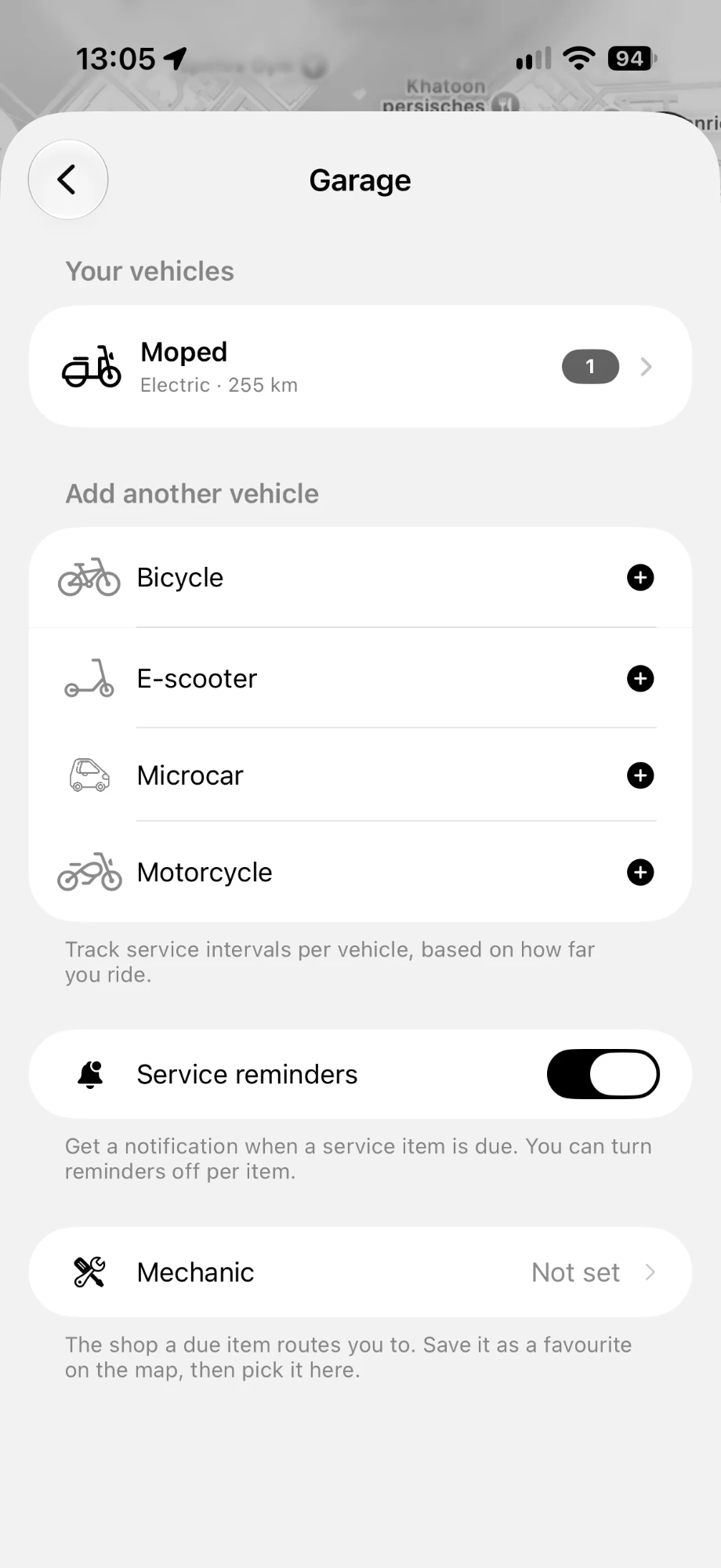
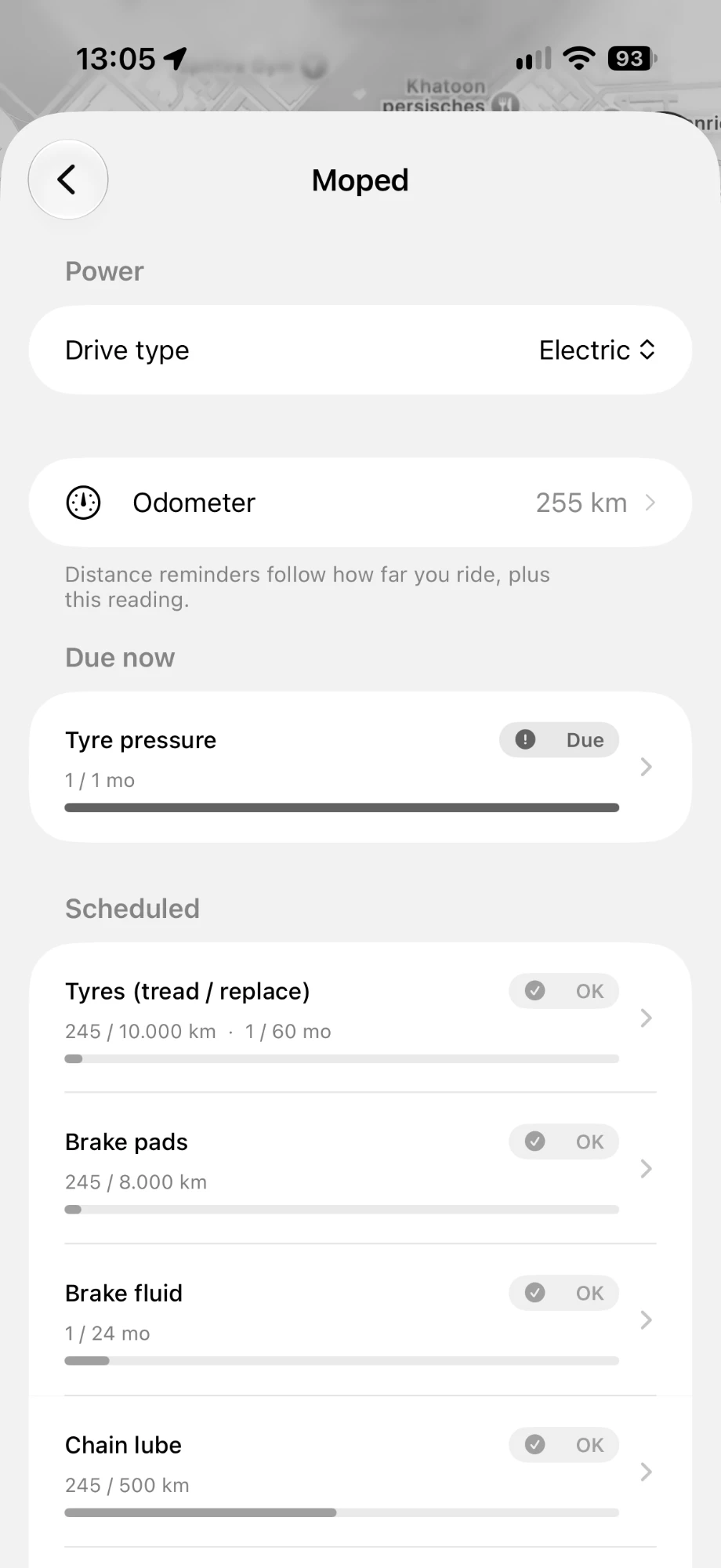
You add your vehicle once, a moped, scooter, e-bike, motorcycle or microcar, and the Garage builds it a service schedule. Each job is its own item with its own interval: tyres, brake pads, brake fluid, chain lube, chain or belt wear, a general inspection, and more. The app sorts them for you. Anything you are close to sits under Scheduled with a progress bar creeping toward full, and the moment something passes its interval it jumps to Due now with a clear Due tag. One look tells you whether the vehicle is fine or needs attention.
Distance, not a calendar you forgot
Here is the part a generic reminders app cannot do. Most two-wheeler maintenance is a distance job, not a monthly one, and a calendar reminder set for "every three months" is wrong the moment your riding changes. Urban Rider is already the app you navigate with, so it knows the distance you cover. Each item carries a distance interval (chain lube every 500 km), a time interval (an annual inspection), or both at once, and the app measures your real riding against it. Set your odometer reading once to anchor it to your actual vehicle, and from then on the schedule tracks how far you genuinely ride, not a date you picked and forgot.
It knows electric from petrol
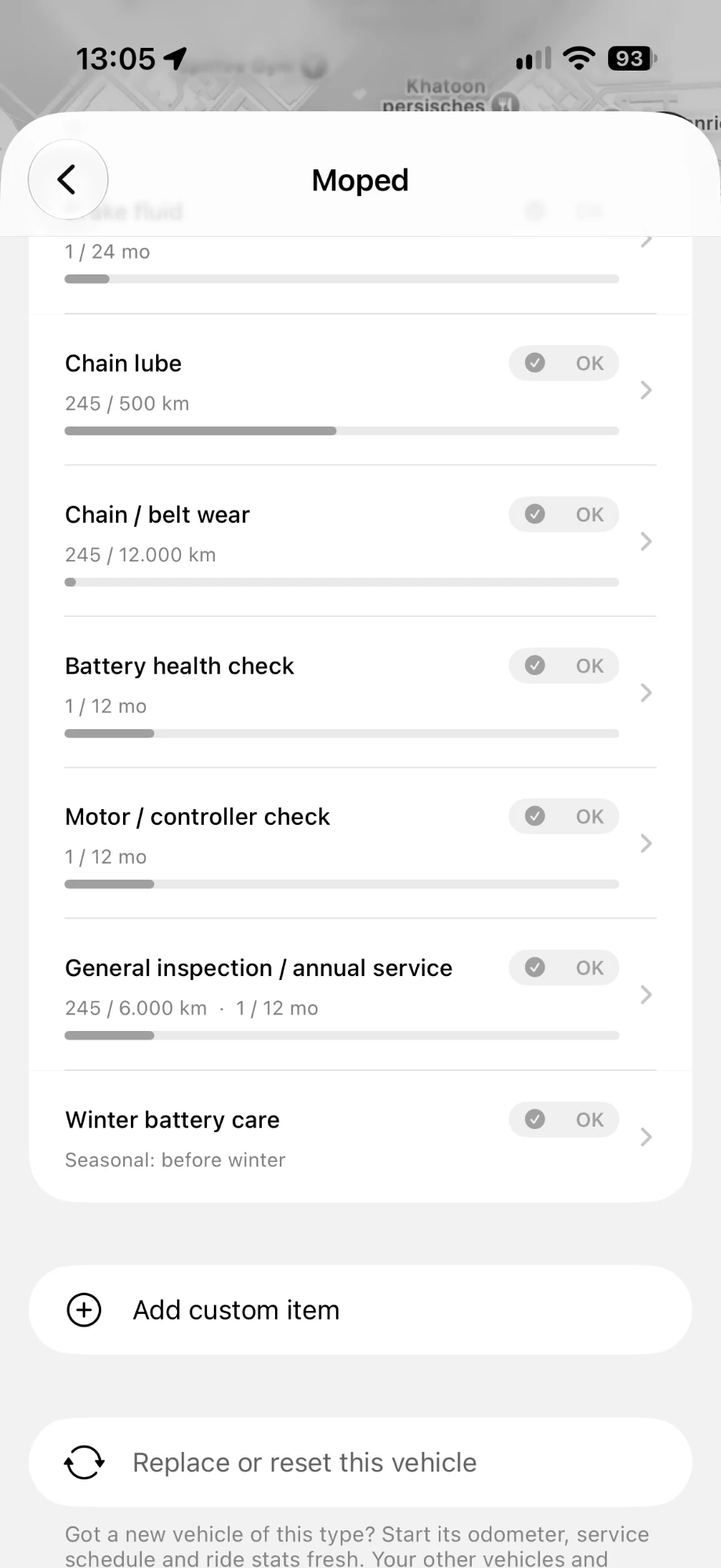
A vehicle has a drive type, and the checklist follows it. An electric moped does not need an oil change, but it does need its own care, so the Garage gives it the items that actually apply: a battery health check, a motor and controller check, and a seasonal winter battery care reminder that comes up before the cold sets in. A petrol machine gets the items its engine needs instead. The parts every vehicle shares, tyres, brakes and, where one is fitted, the chain or belt, are tracked the same way across all of them.
Your bike, your items, your mechanic
No two riders maintain a machine exactly alike, so the schedule bends to you. You can add a custom item for anything specific to your vehicle, and you can point the app at your own shop: save your mechanic as a favourite on the map, pick it in the Garage, and a due item can route you straight there. If you ever replace a vehicle with a new one of the same type, Replace or reset starts its odometer, schedule and stats fresh while your other vehicles stay exactly as they were.
More than one in the Garage
Plenty of riders have a commuter and a weekend bike, or a scooter and a cargo e-bike. The Garage holds them together, each with its own odometer and its own schedule, so the e-bike's chain and the moped's brake pads are tracked separately and never get confused. Add a bicycle, e-scooter, microcar, moped or motorcycle, and each keeps its own service life.
How to set it up
- Open Urban Rider, go to settings and tap Garage.
- Add your vehicle and choose its type and drive type.
- Set the odometer to your vehicle's real reading so the distances line up.
- Leave Service reminders on to be notified when an item is due, and turn reminders off for any single item you would rather track yourself.
- Optionally pick your mechanic from your map favourites, so a due job can route you there.
It is the rest of what the app already does
The Garage fits the same idea as the rest of Urban Rider: your riding generates something useful, if the app bothers to keep it. The same trip data that powers the mileage logbook for tax is what lets the Garage remind you by distance, and it sits alongside the ride stats, parking and weather in the all-in-one scooter navigation app. If you ride electric, the range and charging guide is a good companion, and battery health is one of the things the Garage now keeps an eye on for you. When the cold arrives, our guide to your electric scooter in winter covers the seasonal care that winter battery care reminder is for.

Navigation built for your scooter, not a car
Urban Rider routes your moped or scooter onto roads it is actually allowed to ride, avoids highways by default, gives arrival times at real scooter speed, and now keeps a service schedule for your vehicle. Free 7-day trial, no account needed.


Frequently asked questions
What is the Garage in Urban Rider?
The Garage is a per-vehicle maintenance tracker inside Urban Rider. You add your scooter, moped, e-bike or motorcycle, and the app keeps a service schedule for it: tyres, brake pads, chain lube, battery health and more, each with its own interval. Items you are getting close to show up under Scheduled, and anything past its interval moves to Due now, so you can see at a glance what your vehicle needs.
How does it know when a service is due?
Most two-wheeler service is measured in distance, not months, and Urban Rider is already your navigation app, so it knows how far you ride. Each item has a distance interval (for example chain lube every 500 km), a time interval (for example an annual inspection), or both. The app tracks your riding against that interval and marks the item Due when you reach it. You set your odometer reading once so the numbers line up with your real vehicle.
Does it work for an electric scooter or a petrol one?
Both. You pick the vehicle type and the drive type, and the checklist adapts. An electric moped gets items like battery health check, motor and controller check and winter battery care, while the parts every vehicle shares, tyres, brakes and (where fitted) the chain, are tracked the same way. You can also add your own custom items for anything specific to your machine.
Can I track more than one vehicle?
Yes. The Garage holds a bicycle, e-scooter, microcar, moped and motorcycle side by side, each with its own odometer and its own service schedule. If you replace a vehicle with a new one of the same type, you can reset that vehicle so its odometer, schedule and stats start fresh while your other vehicles stay untouched.
Will it nag me, and does any of this leave my phone?
Service reminders are a single toggle, and you can turn reminders off for any individual item you would rather track yourself. When something is due you get a notification, and you can point it at your own mechanic: save the shop as a favourite on the map and pick it in the Garage, so a due item can route you there. Your schedule and odometer are kept for you to use in the app, not a service you have to sign up for.